Booking links that check every calendar
Your booking link only knows about one calendar, so people book over meetings that live on another. An AllMyMeetings scheduling page checks up to twelve calendars across Google, Outlook and iCloud before it offers a time.
Create a booking page14-day Pro trial · No credit card · Free plan after
The free plan includes one scheduling page. Pro includes three, and Business has no limit.
A good fit if…
- You have work and personal calendars on different providers and want one link that respects both
- You consult for several clients and each has its own calendar
- You want a simple booking link without paying for a separate scheduling tool
Not a fit if…
- You need round-robin or collective scheduling across a team
- You need payments, intake forms or workflows on the booking page
How availability is calculated
A scheduling page has a few settings: the meeting length, a buffer between meetings, the hours and days you take bookings, your time zone, and how many days ahead people can book. Within those hours, the page offers a slot only if it's free on every calendar you ticked.
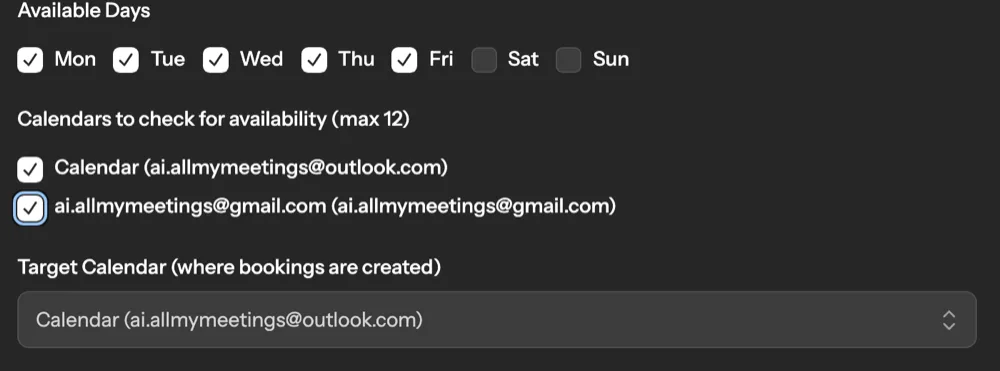
- Up to twelve calendars per page. Tick any calendars from your connected Google, Outlook and iCloud accounts. Every event on them counts as busy.
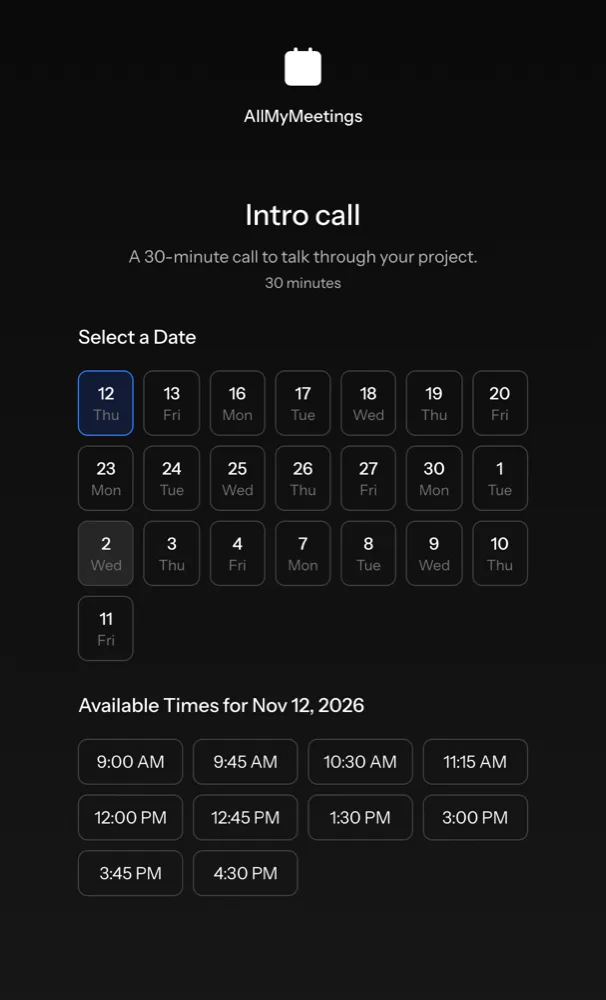
- Buffers apply between offered times. A 30-minute meeting with a 15-minute buffer is offered at 9:00, 9:45, 10:30 and so on, skipping anything that overlaps an event.
- Bookings block too. Existing bookings on the page are treated as busy, and two people can't grab the same slot at once: the second one is told it was just taken.
- Freshness follows the sync. Google and Outlook changes reach AllMyMeetings within seconds. iCloud is checked every five minutes.
In the booking page at the top of this page, Thursday's times run 9:00 AM to 1:30 PM, then jump to 3:00 PM: the 2:15 slot is skipped because of a 2–3 PM meeting on the Outlook calendar.
vs Calendly connected calendars
Calendly checks the calendars you connect for conflicts. Its free plan connects one calendar, and paid plans connect up to six per user. If your other calendars aren't connected, Calendly can't see them, and that's where double-bookings come from.
| AllMyMeetings scheduling page | Calendly | |
|---|---|---|
| Calendars checked | Up to 12 per page, across Google, Outlook and iCloud | 1 on the free plan, up to 6 on paid plans |
| iCloud | Yes, with an app-specific password | Yes |
| Where bookings go | One target calendar you choose | One calendar you choose |
| Pages | 1 free, 3 on Pro, unlimited on Business | Varies by plan |
| Team, routing, payments, workflows | No | Yes, on paid plans |
Calendly is the better tool if you need routing forms, payments, team round-robin or reminder workflows. A scheduling page is the better fit if what you need is one simple link that never offers a time you're busy on any of your calendars, and you already use AllMyMeetings to keep those calendars in sync.
Setup
- Connect your calendars. In Calendar Accounts, connect your Google, Outlook or iCloud accounts and turn on the calendars you use.
- Create the page. Open Scheduling and choose Create Page. Give it a title and URL slug, then set the duration, buffer, hours, time zone, available days and booking window.
- Pick the calendars. Under Calendars to check for availability, tick every calendar that should block time. Under Target Calendar, choose where new bookings are created.
- Share the link. Your page lives at
/schedule/your-slug. Turn it off at any time from the Scheduling list without deleting it.
The free plan includes one scheduling page, alongside one one-way sync. Pro ($5 a month) includes three pages and two-way sync, and Business ($15 a month) removes the limits.
Frequently asked questions
- Can I use it with Calendly?
- Yes, in two ways. You can keep Calendly and use AllMyMeetings sync to copy events from your other calendars onto the one Calendly checks, which gets around the free plan's single-calendar limit. Or you can replace a basic Calendly link with an AllMyMeetings scheduling page, which checks up to twelve calendars directly. Calendly does much more beyond booking links, so keep it if you use routing, payments or team scheduling.
- How fresh is the availability?
- The page reads the events AllMyMeetings has synced from each calendar. Google and Outlook tell AllMyMeetings about changes as they happen, so those are usually current within seconds. iCloud is checked every five minutes, so a brand-new iCloud event can take up to five minutes to block a slot.
- Where do bookings go?
- To the one calendar you choose as the target calendar. AllMyMeetings creates the event there with the person who booked as an attendee. On a Google or Outlook calendar, that sends them a calendar invitation from your account. If you also sync that calendar elsewhere, the booking blocks time on your other calendars too.
One booking link, every calendar checked
Create a booking pageNo card. Your 14-day Pro trial starts when you connect your first calendar. The free plan stays free after.