Outlook calendar sync for Microsoft 365 and Outlook.com
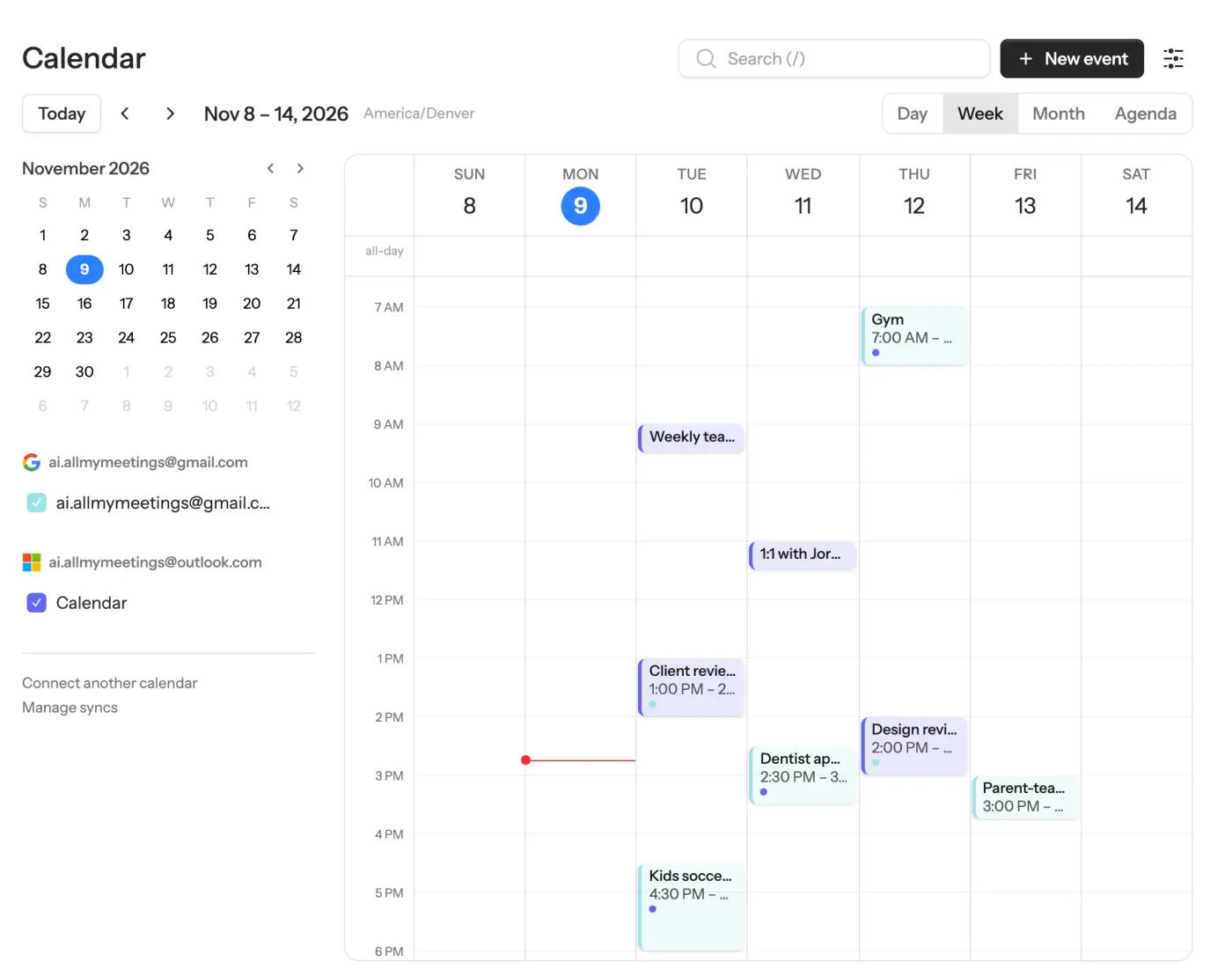
Your company books you from Outlook, but your life lives in Google or iCloud. AllMyMeetings copies events into your Microsoft 365 or Outlook.com calendar as they happen, so colleagues see you're busy and nobody sees why.
Connect Outlook free14-day Pro trial · No credit card · Free plan after
Works with Microsoft 365 work and school accounts and personal Outlook.com, Hotmail and Live accounts. Uses Microsoft Graph, not the retiring EWS.
A good fit if…
- Your work calendar is Microsoft 365 and your personal one is Google or iCloud
- An older Outlook sync tool or add-in stopped working this fall
- You need colleagues to see Busy without the event details
Not a fit if…
- Your mailbox is on an on-premises Exchange server (we connect to Exchange Online and Outlook.com only)
- Your IT team won't approve any third-party calendar app
What changed with the EWS shutdown
For years, many sync tools, scripts and Outlook add-ins talked to Exchange through Exchange Web Services (EWS). Microsoft is retiring it in Exchange Online:
| Date | What happens | Source |
|---|---|---|
| October 1, 2026 | EWS is blocked by default, tenant by tenant, unless an admin opted to keep it | Microsoft Exchange Team |
| April 1, 2027 | EWS is permanently disabled; admins can no longer turn it back on | Same post |
If your old sync stopped this fall with sign-in or connection errors, EWS is a likely cause. On-premises Exchange servers aren't affected.
AllMyMeetings never used EWS. It talks to your calendar through Microsoft Graph, the API Microsoft points developers to as EWS's replacement, and receives change notifications from Graph instead of polling.
Microsoft 365 work accounts vs Outlook.com
Both connect through the same Connect Outlook button, but they behave differently:
| Microsoft 365 (work or school) | Outlook.com, Hotmail, Live | |
|---|---|---|
| Who approves the app | You, or your IT admin, depending on tenant policy | Always you |
| Typical calendars | Your calendar plus calendars you created in your mailbox | Your calendar plus ones you created |
| Common use | The calendar colleagues book you from | A personal calendar to block time on work |
Either one can be the source or the destination of a sync.
Two-way sync with Google and iCloud
Create a sync pair between an Outlook calendar and a Google or iCloud calendar, then choose one-way or two-way:
- Outlook ↔ Google: both sides send change notifications, so edits usually appear on the other side within seconds.
- Outlook ↔ iCloud: Outlook changes arrive by notification; iCloud doesn't offer push to third parties, so we check iCloud for changes every few minutes.
Pick what the copy shows. Free/Busy writes a private "Busy" block with the time only, which is what most people want on a work calendar: colleagues see you're unavailable, not "Pediatrician". Every calendar is also re-checked at least hourly in case a notification is missed. Attendees are never copied, so a synced copy never emails your colleagues.
Two-way sync, real-time notifications and full-detail copies are on Pro ($5 a month). The free plan runs one one-way Free/Busy sync, which is enough to block your work calendar with personal events.
Step-by-step guides for the native options: Google Calendar with Outlook and iCloud calendar with Outlook.
Tenant admin consent: what IT will ask
If your organization requires admin approval, the request lands with IT. These are the answers they'll want:
- What it accesses: your calendars (read and write), your basic profile and your mailbox settings (for your time zone). No mail, contacts, files or directory data.
- Permission type: delegated permissions only. AllMyMeetings acts as you, on your mailbox, and can't read anyone else's.
- Publisher: Wolfgang Solutions, LLC, shown with Microsoft's verified-publisher badge on the consent screen.
- API: Microsoft Graph, so it keeps working after EWS is turned off.
- Storage: sign-in tokens are encrypted before they're stored, and all traffic uses HTTPS. The security page lists exactly what is stored and for how long.
- Removal: disconnecting the account in AllMyMeetings deletes its tokens and removes the copies it synced to other calendars. Admins can also revoke the app in the Entra admin center.
Setup
- Connect Outlook. Click Connect Outlook and sign in with your Microsoft 365 or Outlook.com account. Microsoft shows the permission screen below. Accept, or request approval if your organization requires it.
- Turn on the calendars you want. Your Outlook calendars are listed after connecting; nothing syncs until you choose.
- Create a sync pair with your Google or iCloud calendar, choose the direction and mode, and save. The first sync starts right away.
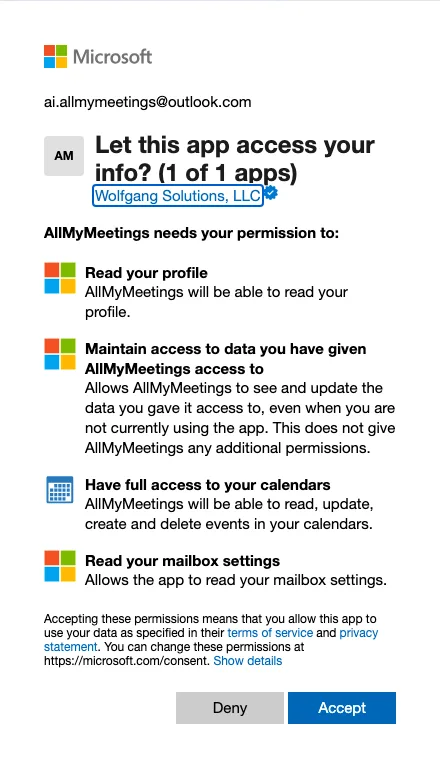
Microsoft's permission screen for AllMyMeetings, captured November 10, 2026 with a personal Outlook.com account. Work and school accounts see a similar screen listing the same permissions.
Frequently asked questions
- Will my company's IT need to approve it?
- It depends on your organization's consent settings in Microsoft Entra ID. If users may consent to apps, you approve AllMyMeetings yourself on Microsoft's permission screen. If not, Microsoft shows a "Need admin approval" message and an administrator grants consent once for the organization. AllMyMeetings is published by a Microsoft-verified publisher, Wolfgang Solutions, LLC, which some consent policies require.
- Does it work with the new Outlook for Windows?
- Yes. AllMyMeetings syncs with your mailbox in Microsoft's cloud, not with an Outlook app on your computer, so there's no add-in to install. Synced events appear in new Outlook for Windows, classic Outlook, Outlook for Mac, Outlook on the web and the Outlook mobile apps, because they all read the same calendar.
- Did the EWS shutdown break calendar sync?
- It can break tools that still use Exchange Web Services. Microsoft began blocking EWS in Exchange Online tenants on October 1, 2026, unless an admin opted to keep it, and plans to turn it off for good on April 1, 2027. AllMyMeetings uses Microsoft Graph, Microsoft's supported API, so neither date affects it.
- What permissions does AllMyMeetings ask Microsoft for?
- Four: read your basic profile, keep access while you're not using the app (so sync runs in the background), full access to your calendars (to read events and write the synced copies), and read your mailbox settings, which is only used to get your time zone. It does not ask for mail, contacts or files.
Put your whole week on your Outlook calendar
Connect Outlook freeNo card. Your 14-day Pro trial starts when you connect your first calendar. The free plan stays free after.