iCloud calendar sync for Android, Google and Outlook
Your family calendar lives in iCloud, but your work calendar is Google or Outlook, or your phone is Android. AllMyMeetings copies iCloud events onto the calendars you actually check, so nobody books over them.
Connect iCloud free14-day Pro trial · No credit card · Free plan after
AllMyMeetings signs in to iCloud Calendar with an app-specific password you create at Apple and can revoke at any time. It never sees your Apple Account password.
A good fit if…
- Your personal calendar is in iCloud and your work calendar is Google or Outlook
- You switched to Android and still share an iCloud calendar with family
- You want iCloud events to block time elsewhere as "Busy", without the details
Not a fit if…
- You only use Apple devices and only need to see your calendars, not block time (Apple Calendar already shows them together)
- You need changes to appear within seconds both ways: iCloud is checked every five minutes
Why iCloud is different
Google and Microsoft let you connect a calendar app by signing in and clicking Allow. Apple doesn't. iCloud Calendar is reached through CalDAV, an open calendar standard, and outside apps sign in with an app-specific password: a separate password Apple generates for one app, which you can revoke on its own.
Apple also doesn't notify outside apps when an event changes. So instead of waiting for a notification, AllMyMeetings checks iCloud for changes every five minutes. In practice:
- An event added on your iPhone appears on your Google or Outlook calendar within about five minutes.
- An event added in Google or Outlook is copied to iCloud as soon as AllMyMeetings hears about it, usually within seconds.
Show iCloud on Android via Google Calendar
Apple doesn't make a calendar app for Android, and Android's calendar apps don't connect to iCloud on their own. You have three options:
- A CalDAV app. Third-party apps can add iCloud as a CalDAV account on Android with an app-specific password. It works, but it's one more app to keep running, and it only helps on that phone.
- A subscription link. Publish the iCloud calendar publicly and subscribe to it in Google Calendar. It's read-only, refreshes every few hours at best, and anyone with the link can read it. The Apple to Google guide covers the steps and the privacy catch.
- Sync iCloud into Google Calendar. Every Android phone already shows Google Calendar. Copy your iCloud events into it, and they appear on the phone with no extra app, and on the web and anywhere else you use Google.
With AllMyMeetings, pick Full Details to see the real event titles on Android, or Free/Busy if the Google calendar is a work calendar and you only want the time blocked. Two-way sync on Pro also sends events you create on Android back to iCloud, so your family still sees them on their iPhones.
Setup with an app-specific password
You need two-factor authentication on your Apple Account, which is on by default for most accounts.
1. Create the app-specific password at Apple:
- Go to account.apple.com and sign in.
- Under Sign-In and Security, choose App-Specific Passwords.
- Generate a new password and label it "AllMyMeetings". Apple shows it once, so copy it now.
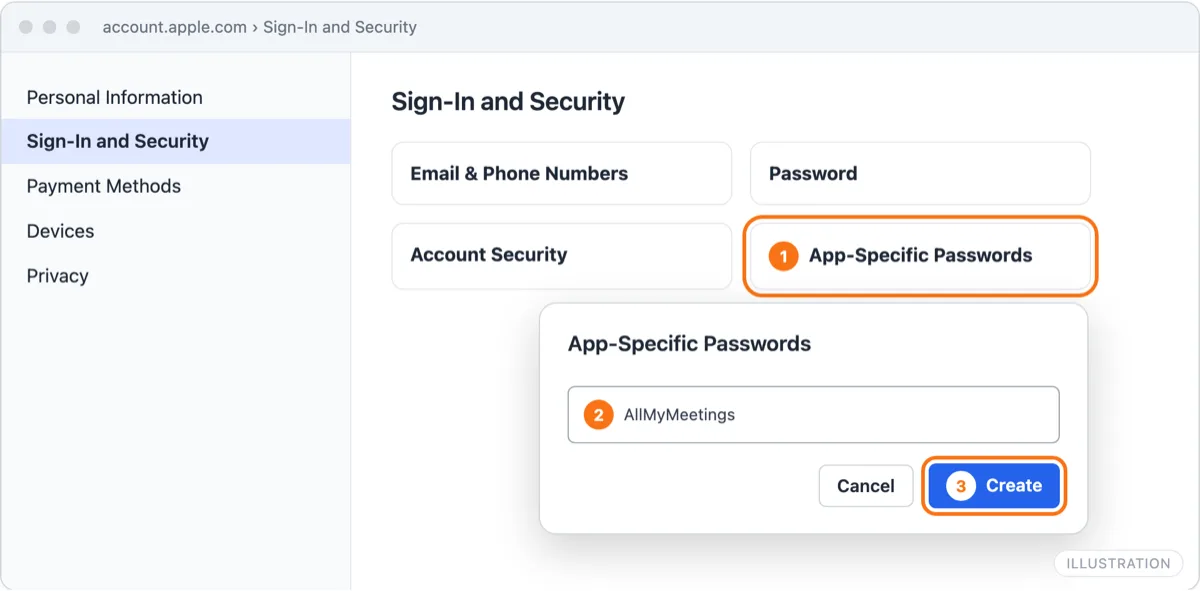
Illustration of account.apple.com. The labels match Apple's.
2. Connect iCloud in AllMyMeetings:
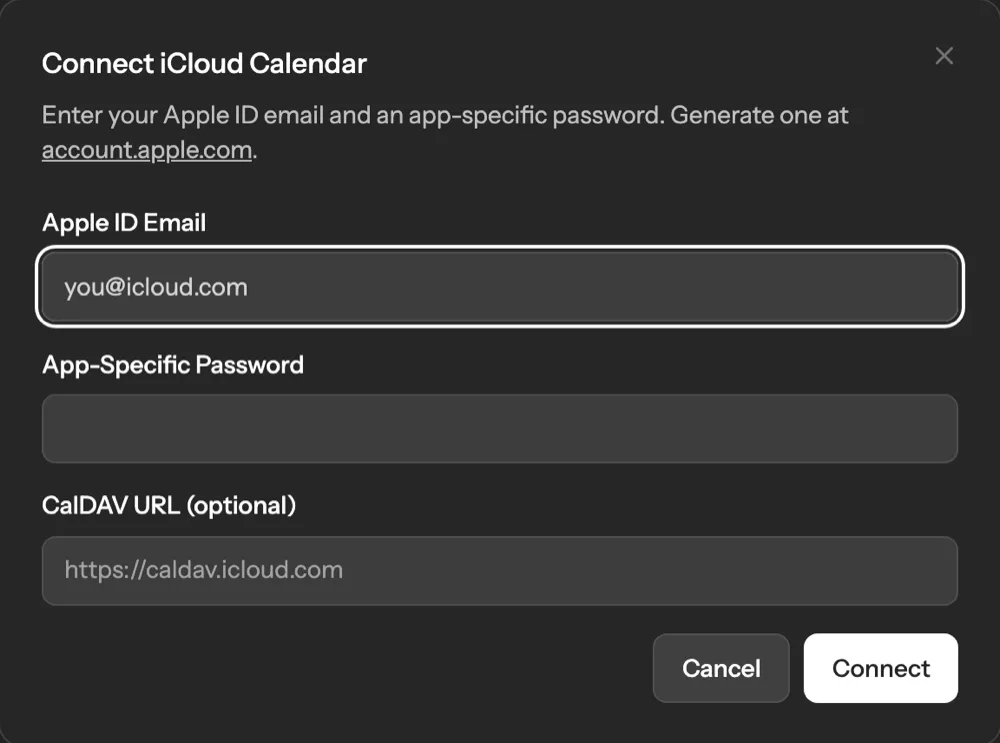
- Open Calendar Accounts and choose iCloud.
- Enter the email address of your Apple Account and paste the app-specific password. Leave CalDAV URL empty; it's only for unusual setups.
- Select Connect, then turn on the iCloud calendars you want to sync.
3. Create a sync pair. Choose the iCloud calendar and your Google or Outlook calendar, one-way or two-way, and a mode: Full Details, Free/Busy or Private. The first sync starts right away.
The free plan includes two calendar accounts and one one-way sync in Free/Busy mode, for example iCloud events blocking time on your work calendar. Two-way sync, Full Details and more pairs are on Pro at $5 a month. For step-by-step guides with each provider, see Apple Calendar to Google and iCloud with Outlook.
Revoking access at Apple
You can cut AllMyMeetings off from iCloud at any time, from either side:
- At Apple: sign in at account.apple.com, open Sign-In and Security, then App-Specific Passwords, and remove the "AllMyMeetings" password. It stops working immediately.
- In AllMyMeetings: disconnect the iCloud account. That deletes the stored password and removes the copies of iCloud events from your other calendars.
Changing your Apple Account password also revokes every app-specific password at once. If you do that, create a new one and reconnect. Our security page lists exactly what we store.
Frequently asked questions
- Is an app-specific password safe?
- It's the method Apple provides for third-party apps. The password is generated by Apple, works only for apps that use it to sign in, and can be revoked on its own at account.apple.com without changing your main password. It can reach iCloud Mail, Contacts and Calendars, not your photos, files or payments. AllMyMeetings stores it encrypted and only uses it for calendars.
- Why is iCloud checked every 5 minutes?
- Apple doesn't send change notifications to outside apps, so there's no way for iCloud to tell AllMyMeetings that an event changed. Instead AllMyMeetings asks iCloud for changes every five minutes. Google and Outlook do send notifications, so changes made there reach iCloud within seconds of AllMyMeetings hearing about them.
- Can I see my iCloud calendar on Android?
- Apple doesn't make a calendar app for Android. The simplest route is to sync your iCloud calendar into your Google Calendar, which every Android phone shows. With AllMyMeetings, iCloud events appear in Google Calendar within about five minutes, and two-way sync on Pro sends events you add on Android back to iCloud.
- What happens if I change my Apple Account password?
- Apple revokes every app-specific password when you change or reset your Apple Account password, so the iCloud connection stops working. Create a new app-specific password and reconnect iCloud in AllMyMeetings. You'll get an email if the connection keeps failing, and nothing on your other calendars is deleted in the meantime.
Make your iCloud calendar count everywhere
Connect iCloud freeNo card. Your 14-day Pro trial starts when you connect your first calendar. The free plan stays free after.