How to add Google Calendar to Outlook
Your meetings are in Outlook and your life is in Google Calendar. Here's how to get Google into every version of Outlook, why the result is usually read-only and hours behind, and what to do about it.
Steps checked November 11, 2026 on Outlook on the web (Outlook.com).
Short answer: in Google Calendar on a computer, open the calendar's Settings and sharing, find Integrate calendar, and copy the Secret address in iCal format. In Outlook, choose Add calendar, then Subscribe from web (or Add Calendar, then From Internet in classic Outlook), paste the address and import it. Your Google events appear in Outlook as a separate, read-only calendar that refreshes every few hours.
The steps differ by version, so start by working out which Outlook you have.
Which Outlook do you have?
| You see… | You have |
|---|---|
| A New Outlook toggle in the top right on Windows, and a layout that looks like the web version | New Outlook for Windows |
| A File tab and a full ribbon with Home, Send / Receive, Folder and View | Classic Outlook for Windows |
| Outlook in a browser at outlook.com or outlook.office.com | Outlook on the web |
| Outlook on a Mac | Outlook for Mac |
| The Outlook app on your phone | Outlook for iPhone or Android |
Every desktop method below starts with the same link from Google Calendar:
- Open Google Calendar on a computer. You can't get the link from the phone app.
- Under My calendars, hover over the calendar, click the three dots and choose Settings and sharing. (Or open Settings from the gear icon and click the calendar's name under Settings for my calendars.)
- Click Integrate calendar and copy the Secret address in iCal format.
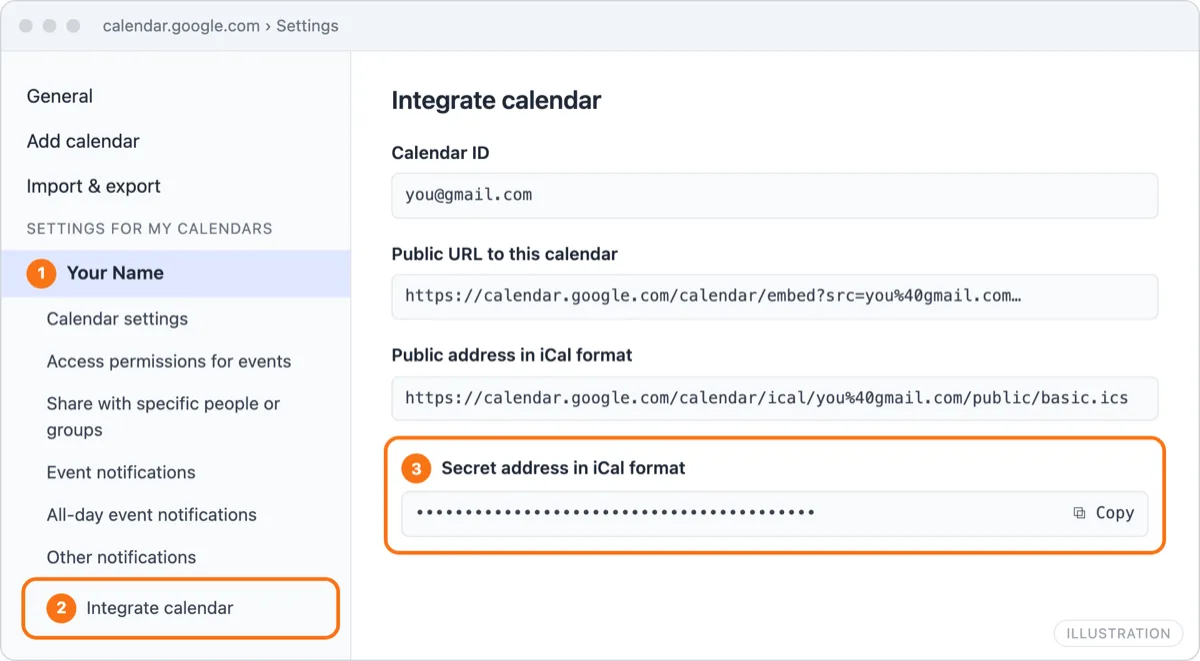
Treat that address like a password: anyone who has it can read every event on the calendar. If it leaks, click Reset next to it in the same place and the old link stops working. If you can't see it on a work or school account, your Google Workspace admin has turned it off.
New Outlook for Windows
- Open the calendar in new Outlook.
- Under the month calendar on the left, select Add calendar.
- Choose Subscribe from web.
- Paste the secret address, give the calendar a name such as "Google", pick a color, and select Import.
The Google calendar appears under Other calendars. New Outlook uses the same Add calendar window as Outlook on the web, shown in the next section.
New Outlook can also add a Gmail account under Settings, then Accounts. Whether its calendar comes along has changed between releases, so if you want Google events in Outlook, the subscription above is the reliable route.
Classic Outlook for Windows
- Go to the Calendar and, on the Home tab, select Add Calendar, then From Internet….
- Paste the secret address into the box and select OK.
- Outlook asks whether to add this Internet Calendar and subscribe to updates. Select Yes.
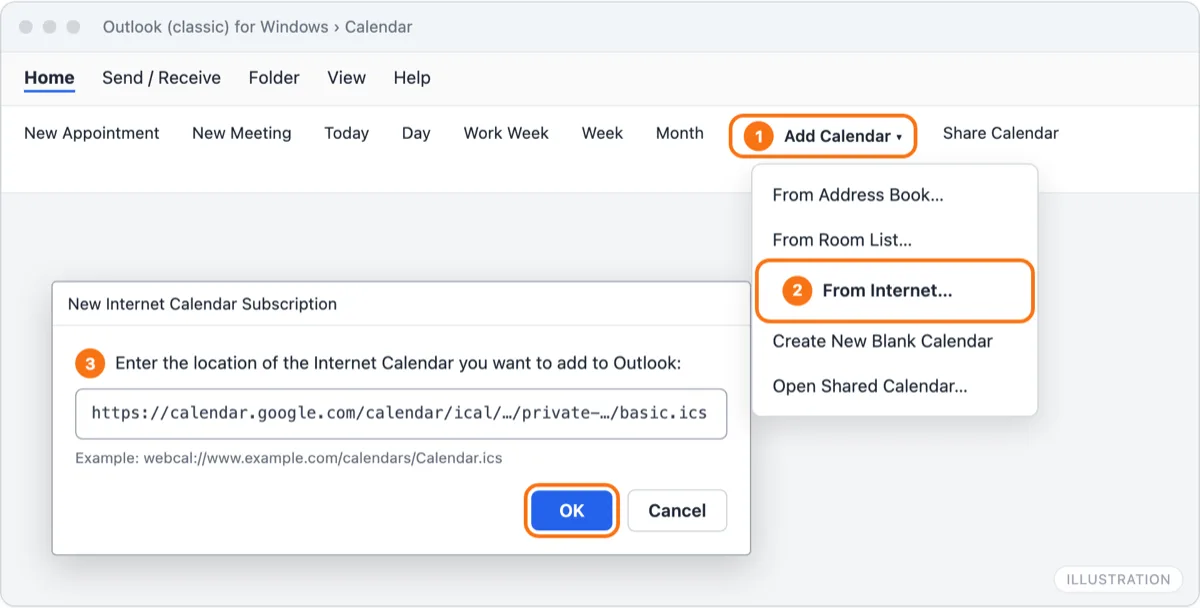
The calendar shows under Other Calendars in the folder pane. Classic Outlook refreshes it on its own schedule, and you can't choose how often.
If you get "Cannot verify or add the calendar" or a similar error, copy the address again from Google, since a partial or reset link is the usual cause. If it still fails, add the subscription in Outlook on the web with the same Microsoft account. It then appears in classic Outlook too, and Microsoft's servers handle the refresh.
Adding a Gmail account to classic Outlook through File, then Add Account, brings in your email but not your Google calendar, so it doesn't help here.
Outlook on the web
- Go to outlook.com or outlook.office.com and open the calendar.
- Under the month calendar on the left, select Add calendar.
- Choose Subscribe from web and paste the secret address.
- Name the calendar, pick a color and, under Add to, leave Other calendars selected. Select Import.
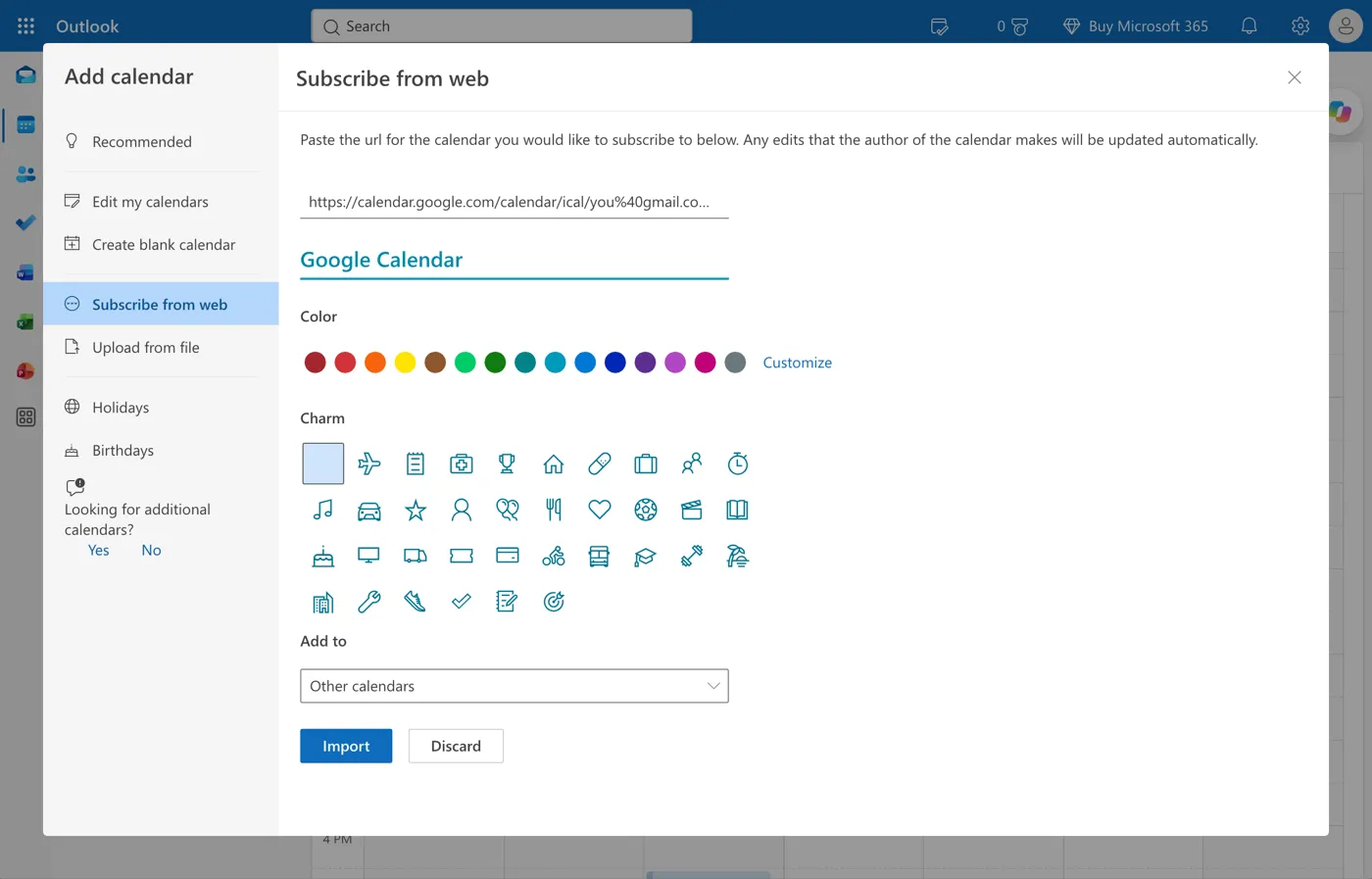
This is also the most dependable method for every other version. A subscription added on the web belongs to your Microsoft account, so it shows up in new Outlook, classic Outlook, Outlook for Mac and the Outlook mobile app that use the same account.
Outlook for Mac
New Outlook for Mac can add a Google account directly:
- Open Outlook and go to Settings, then Accounts.
- Click + and add a new account with your Gmail or Google Workspace address.
- Sign in with Google in the window that opens and allow Outlook access.
Your Google calendars then appear in Outlook's calendar under that account, and you can create and edit Google events from Outlook.
Outlook for Mac doesn't subscribe to calendar links by itself. To add a Google calendar by its secret address instead, subscribe in Outlook on the web (steps above) with the same Microsoft account you use on the Mac. The subscription then appears in Outlook for Mac.
iPhone and Android Outlook app
The Outlook app can't subscribe to a calendar link, but it can hold a Google account:
- Open Outlook and tap your profile picture or the account icon at the top left.
- Add a new account and choose to sign in with Google.
- Allow Outlook access to your Google account.
The Google calendars show in Outlook's calendar alongside your Microsoft calendars. A Google calendar you subscribed to in Outlook on the web also shows in the app automatically, as part of your Microsoft account.
Why your Google events are read-only or late
Every method above has the same limits, because none of them copies events onto your Outlook calendar:
- Subscriptions are read-only. You can't edit, move or delete Google events in Outlook. Change them in Google and wait.
- Subscriptions are slow. Microsoft says an internet calendar subscription can take more than 24 hours to update, and you can't force a refresh. A meeting added in Google this morning may not be in Outlook until tomorrow.
- Nothing blocks your Outlook time. The Google events live in a separate calendar. Outlook's free/busy, the Scheduling Assistant, Teams and booking pages only read your main Outlook calendar, so colleagues still see you as free during every Google event.
- Adding the Google account doesn't change that. Where Outlook can hold a Google account, the events are live and editable, but they're still on the Google calendar, not the Outlook one.
Make it two-way and real-time
If you need Google events to actually block time in Outlook, or you edit events in both, the calendars have to be synced rather than overlaid. Need it two-way? Sync free.
AllMyMeetings copies events between Google and Outlook as real events:
- Connect your Google account and your Outlook or Microsoft 365 account.
- Create a sync pair between the Google calendar and the Outlook calendar, one-way or two-way.
- Choose a mode: Full Details, Free/Busy (copies only say "Busy") or Private.
Google and Microsoft both notify AllMyMeetings when something changes, so copies usually update within seconds rather than hours. Copies never invite attendees, and each one carries a hidden marker so it's never copied back. The free plan covers one one-way Free/Busy sync. Two-way sync and full details are on Pro at $5 a month. For the full comparison of methods, including Zapier and scripts, see how to sync Google Calendar with Outlook.
Troubleshooting
Outlook says it couldn't import the calendar. Copy the address again from Integrate calendar in Google. Make sure you copied the Secret address in iCal format, which ends in basic.ics, not the public URL. If the address starts with webcal://, try changing it to https://.
The secret address is missing in Google. On a work or school account, your Google Workspace admin has disabled it. Ask them, or use a sync service that signs in with Google instead.
The calendar was added but it's empty. Large calendars can take a few minutes to load the first time. Check that you copied the link for the right calendar if you have several.
Changes in Google haven't reached Outlook. That's the subscription refresh delay. Wait, or remove and re-add the calendar to force a fresh download.
Events show at the wrong time. Check the time zone in Google Calendar's Settings, then General, and in Outlook's calendar settings. Both should match where you are.
You reset the secret address in Google. The old link stops working, and Outlook keeps showing the last copy it downloaded. Remove the subscription and add it again with the new address.
Frequently asked questions
Why doesn't Google Calendar update in Outlook?
A Google calendar added by its iCal link is a subscription, and Outlook decides when to download it again. Microsoft says updates can take more than 24 hours to appear, and there's no button to refresh it. If you need changes within minutes, add your Google account directly where your version of Outlook allows it, or use a sync service that copies events as they change.
Can I edit Google events in Outlook?
Not when you've subscribed with the iCal link: subscribed calendars are read-only, so you edit the event in Google Calendar and wait for Outlook to pick up the change. Where Outlook lets you add the Google account itself, such as new Outlook for Mac and the Outlook mobile app, you can edit Google events from Outlook.
Is adding a Google account to Outlook the same as syncing?
No. Adding the account shows your Google calendar next to your Outlook calendar, but the events stay in Google. Your Outlook calendar, and anyone checking your availability in Outlook or Teams, still sees you as free during Google events. Syncing copies the events onto the Outlook calendar itself, so they block time there.
Start with AllMyMeetings for free and have your Google events block time in Outlook.
Outlook calendar sync · Google Calendar sync · How to sync Google Calendar with Outlook
Ready to sync your calendars?
AllMyMeetings keeps Google, Outlook, and iCloud calendars in sync automatically. No card: your 14-day Pro trial starts when you connect your first calendar, and the free plan stays free after.
Get started for free