How to add an Outlook calendar to Google Calendar
Your work meetings are in Outlook, but you plan your life in Google Calendar. Here's how to get Outlook events into Google, why they arrive hours late, and how to make them arrive in seconds.
Steps checked November 11, 2026 on Outlook on the web (Outlook.com).
Short answer: in Outlook on the web, open Settings, then Calendar, then Shared calendars. Under Publish a calendar, pick your calendar and how much detail to share, select Publish, and copy the ICS link. Then in Google Calendar, click + next to Other calendars, choose From URL, paste the link and select Add calendar. Your Outlook events appear in Google as a read-only calendar that updates every few hours.
This works for personal Outlook.com accounts and for Microsoft 365 work accounts, as long as your company allows publishing. If you want the opposite direction, Google events in Outlook, that's a different set of steps.
Publish the Outlook calendar (Microsoft 365 and Outlook.com)
Publishing is done in Outlook on the web, whichever Outlook app you normally use. The calendar belongs to your Microsoft account, so publishing it once covers every app.
- Go to outlook.office.com for a work or school account, or outlook.com for a personal one, and open the calendar.
- Select the gear icon to open Settings, then choose Calendar, then Shared calendars.
- Under Publish a calendar, choose the calendar from Select a calendar.
- Choose how much to share under Select permissions: only when you're busy, titles and locations too, or all details.
- Select Publish. Outlook shows two links: HTML for viewing in a browser and ICS for calendar apps. Copy the ICS link.
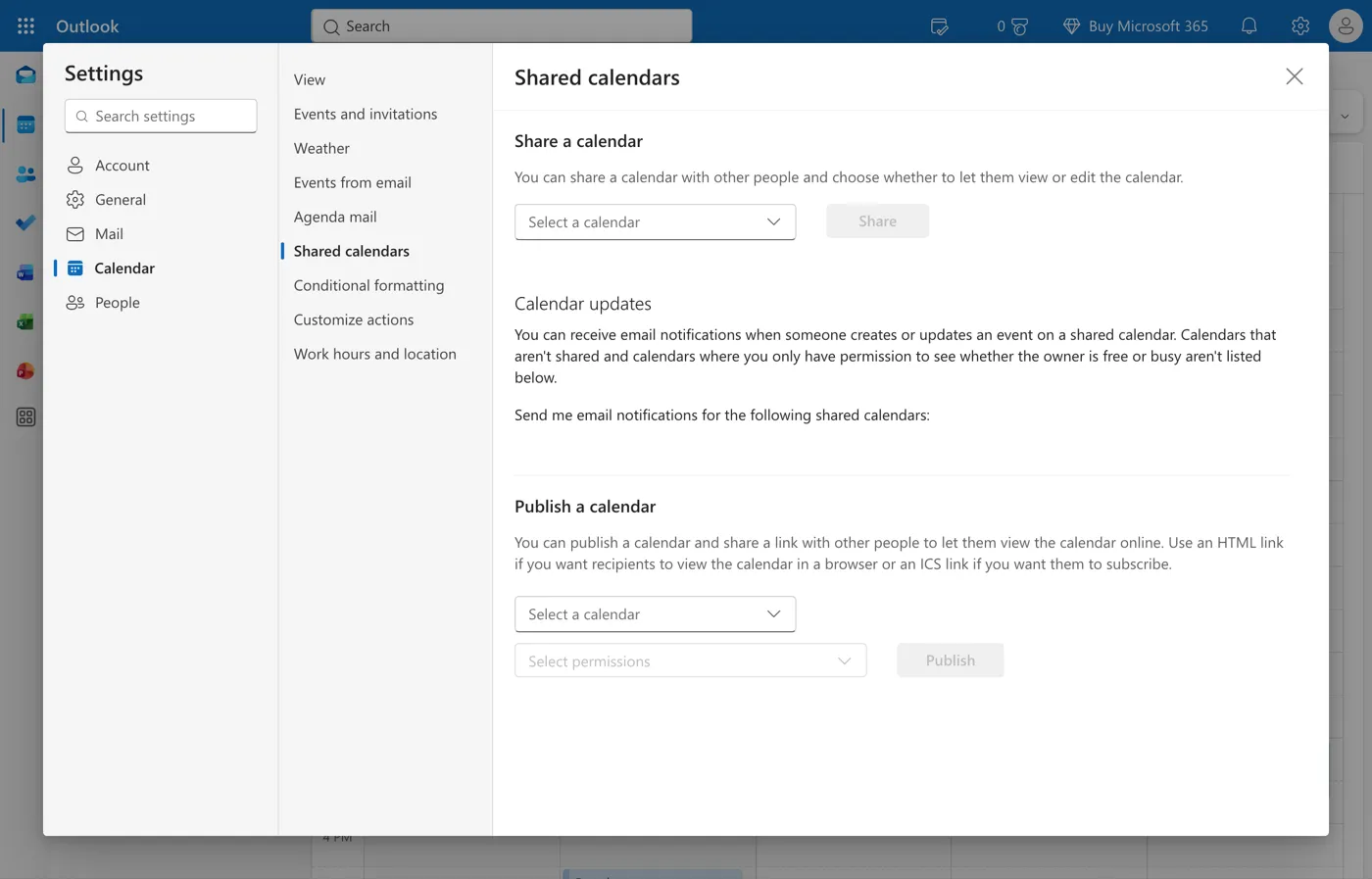
Anyone with the ICS link can read the calendar at the level you chose, so treat it like a password. Share only busy times unless you really need the details in Google. To stop sharing, come back to the same place and select Unpublish, which kills the old link.
In new Outlook for Windows, the same settings are under Settings, then Calendar, then Shared calendars. If you use classic Outlook, publish from Outlook on the web as above.
Subscribe by URL in Google Calendar
- Open Google Calendar on a computer. You can't add a calendar by URL from the phone app.
- On the left, next to Other calendars, click + and choose From URL.
- Paste the ICS link from Outlook.
- Select Add calendar.
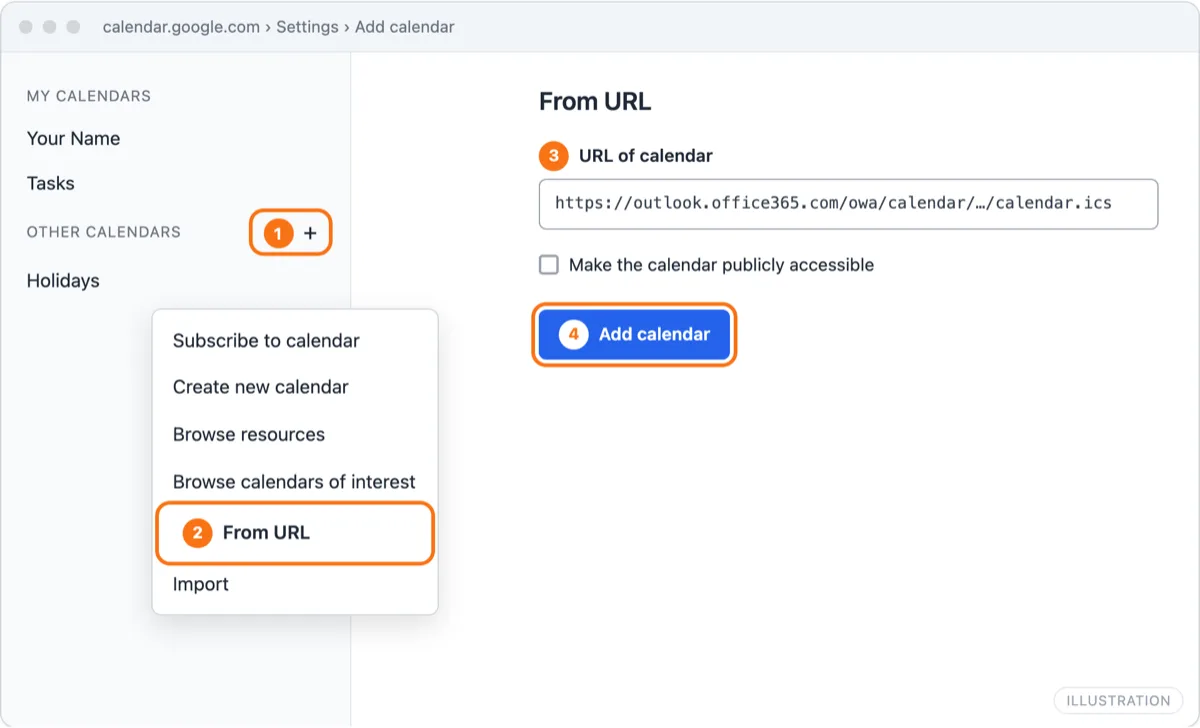
The calendar appears under Other calendars. Click its three dots and choose Settings to rename it, say to "Work (Outlook)", and give it a color. It also shows in the Google Calendar app on your phone once it's added on the web.
Leave Make the calendar publicly accessible unticked. It's about your Google copy, not Outlook, and there's no reason to publish your work calendar a second time.
Why it's one-way and can lag up to 24 hours
A calendar added by URL isn't synced. Google downloads the whole ICS file now and then and shows what it finds. That has three consequences:
- It's one-way. Events you add in Google never reach Outlook.
- It's read-only. You can't move or decline an Outlook meeting from Google.
- It's late. Google doesn't publish how often it refreshes these calendars and has no refresh button. Changes commonly take many hours, and sometimes most of a day. A meeting moved this morning may still show at the old time in Google this afternoon.
There's a fourth, quieter problem. The Outlook events sit in a separate subscribed calendar, and tools that check your Google availability usually skip subscribed calendars. If people book you through Google, they can still book over your Outlook meetings.
Work accounts where publishing is blocked by IT
Many Microsoft 365 organizations turn off anonymous calendar publishing, because an ICS link can leak meeting titles outside the company. If Publish a calendar is missing, or you can't choose your calendar or any permission, your admin has disabled it. Your options:
- Ask IT. Some companies allow publishing busy times only, which is enough for blocking time.
- Share instead of publish. If external sharing is allowed, Share a calendar on the same settings page can share with your personal Gmail address. You get an email with a link to add it in Google.
- Use a sync service your company approves. AllMyMeetings signs in to Microsoft 365 with your own work account. In tenants that block third-party apps, an admin has to approve it first. The Outlook calendar sync page explains what that request asks for.
Don't route around the policy by forwarding every meeting invitation to a personal address. That copies attendee lists and meeting content outside the company, which is usually exactly what the policy is there to stop.
Two-way, real-time alternative
If you need Outlook meetings to block time in Google within seconds, or you want to edit in either place, you need sync rather than a subscription. Need it real-time? Sync free.
AllMyMeetings copies events between Outlook and Google as real events:
- Connect your Outlook or Microsoft 365 account and your Google account.
- Create a sync pair from the Outlook calendar to the Google calendar, one-way or two-way.
- Choose a mode: Full Details, Free/Busy (copies only say "Busy") or Private.
Microsoft and Google both notify AllMyMeetings when something changes, so copies usually update within seconds. Copies never carry attendees, so nobody gets invitations. The free plan covers one one-way Free/Busy sync, which is often all you need: Outlook meetings showing as Busy on your personal Google calendar. Two-way sync and full details are on Pro at $5 a month.
For every other method, including Zapier and Google Workspace's own interoperability, see how to sync Google Calendar and Outlook both ways.
Frequently asked questions
Why is my Outlook calendar not updating in Google?
Google Calendar downloads calendars added by URL on its own schedule, and doesn't say how often. In practice changes often take many hours to appear, and there's no refresh button. Check the link still works by opening it in a browser. If it does, the delay is Google's. If it doesn't, the calendar may have been unpublished or the link reset in Outlook.
My company blocks calendar publishing, what now?
Ask IT whether they'll allow publishing for your account, or whether sharing your calendar with your personal address is allowed instead. If neither is, a sync service that signs in to Microsoft 365 with your work account can copy events to Google, but in locked-down tenants an admin has to approve that app too. Don't forward work invitations to a personal account if policy forbids it.
Can I edit Outlook events from Google Calendar?
No. A calendar added by URL is read-only in Google. You change the event in Outlook and wait for Google to download the calendar again. To edit in either place, you need two-way sync, which copies events as real events on both calendars.
Start with AllMyMeetings for free and have your Outlook meetings block time on Google Calendar.
Ready to sync your calendars?
AllMyMeetings keeps Google, Outlook, and iCloud calendars in sync automatically. No card: your 14-day Pro trial starts when you connect your first calendar, and the free plan stays free after.
Get started for free