Google Calendar not syncing: fixes by device
An event you added on your laptop isn't on your phone, or a meeting moved hours ago still shows the old time. Work through these checks in order: the fast ones first, then the fixes for your device.
Short answer: most sync problems come down to four things: no connection, sync switched off for the Google account on the device, a calendar that's hidden or not selected for sync, or a calendar that was added by URL and only refreshes every few hours. Start with the quick checks below, then go to your device.
Quick checks
Try these first. Each takes under a minute.
- Check the event on the web. Open calendar.google.com in a browser. If the event is there, Google has it and the problem is your device or app. If it isn't, it was never saved to Google (see the last fix below).
- Check your connection. Make sure Wi-Fi or mobile data works and airplane mode is off. Low Power Mode on iPhone and battery saver on Android can delay background sync.
- Check the calendar is visible. In the Calendar app, open the list of calendars and make sure the box next to the missing calendar is ticked.
- Check you're signed in to the right account. Many people have a personal Gmail and a work account. The event may be on the other one.
- Check where new events go. If events created on your phone never reach the web, they're probably being saved to a calendar that isn't on your Google account, such as an iCloud calendar on iPhone or a calendar stored only on an Android phone.
iPhone
Apple Calendar connects to Google through the Google account added to your iPhone.
- Calendars is turned off. Go to Settings, Apps, Calendar, Calendar Accounts, tap your Gmail account and make sure Calendars is on. On older iOS versions the path starts Settings, Calendar, Accounts.
- Fetch is set to Manual. Google accounts on iPhone don't push changes. In Calendar Accounts, tap Fetch New Data, choose the Google account and set it to Fetch, then pick a schedule such as every 15 minutes.
- A shared or secondary calendar is missing. Google only sends your primary calendar to Apple devices by default. Tick the others on Google's Calendar sync page, select Save, then reopen the Calendar app.
- The account needs signing in again. After a Google password change, tap the account in Calendar Accounts and sign in. If that fails, delete the account and add it again.
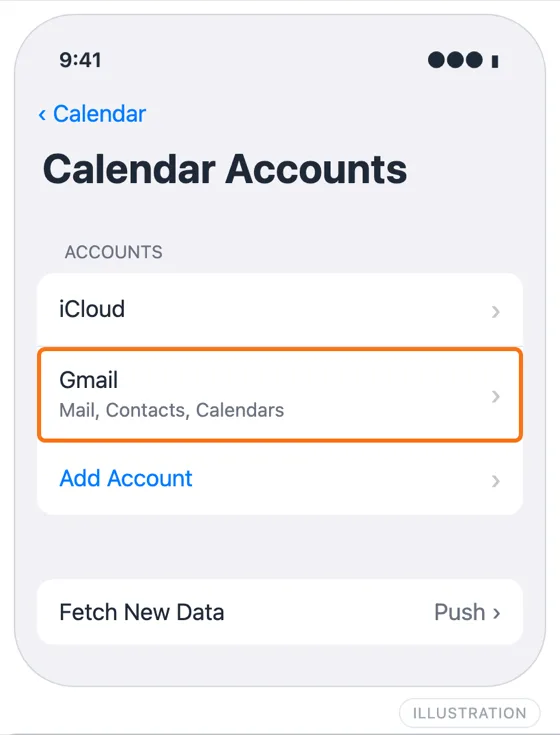
Illustration: your Google account appears as Gmail under Calendar Accounts.
For the full setup, including Mac, see how to sync Google Calendar with Apple Calendar.
Android
These steps follow Google's own help. Menu names vary a little between phone makers.
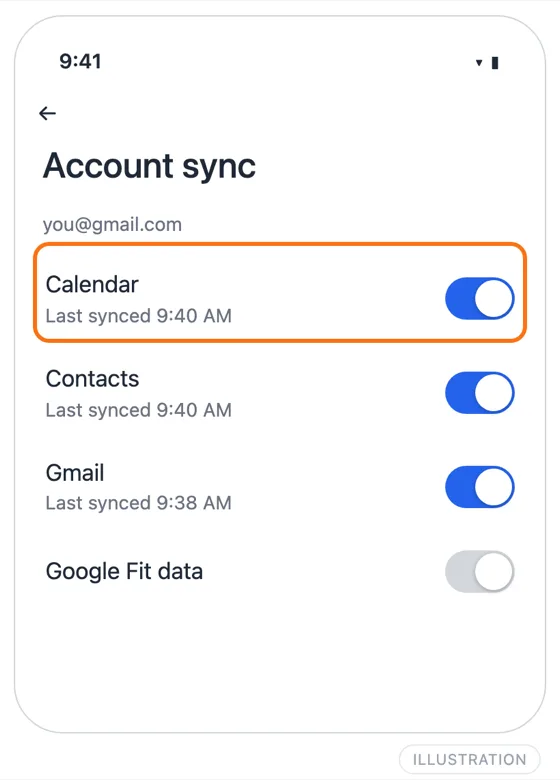
- Turn on account sync. Open the Settings app, go to Passwords, passkeys & accounts (or Accounts), tap your Google account, tap Account sync, and make sure Calendar is on.
- Turn on sync for each calendar. In the Google Calendar app, open Settings, tap the missing calendar (use Show more if it's hidden) and turn on Sync. Your primary calendar shows as "Events" and has no toggle.
- Refresh. In the Calendar app, open the menu and tap Refresh.
- Check Calendar storage. In Settings, Apps, See all apps, show system apps and make sure Calendar storage is enabled.
- Free up space. Google notes that the Calendar app stops syncing when the phone runs out of storage.
- Update the app. Install any Google Calendar update from the Play Store.
As a last resort, clear the Calendar app's storage in Settings, Apps, Calendar, Storage & cache, and restart the phone. Events that hadn't synced yet can be lost, so only do this when nothing else works. The Android app also only keeps about a year of past events; older ones are still on the web.
Outlook
How Google Calendar gets into Outlook decides how fast it updates.
- Subscribed with the iCal link. This is the usual setup, and it's slow by design. Outlook downloads the calendar on its own schedule, and Microsoft says updates can take more than 24 hours. There's no refresh button. Removing and re-adding the calendar forces a fresh copy.
- Wrong link. The link must be the Secret address in iCal format from the calendar's Integrate calendar settings, not the public address. The public one only works if the calendar is public.
- Reset link. If you or an admin reset the secret address in Google, the old link stops working and Outlook keeps showing the last copy it downloaded. Subscribe again with the new address.
- Google account added to Outlook. In new Outlook for Mac and the Outlook mobile app, check the Google account is still signed in under the app's account settings.
How to add Google Calendar to Outlook covers each Outlook version step by step.
Shared calendars
A calendar someone shared with you has its own failure points:
- It's not shared with this account. Check the email address the owner shared it with. Shares to a personal Gmail don't show up in your work account, and the other way round.
- Your access was reduced. If the owner changed you to See only free/busy, events show as "busy" with no details. Ask them to change it.
- Workspace blocks external sharing. A Google Workspace admin can stop calendars being shared outside the organization. The share then never arrives.
- It's missing on iPhone. Use the Calendar sync page step in the iPhone section.
- It's missing on Android. Turn on Sync for it in the Calendar app's settings, as in step 2 of the Android section.
When it's the subscription delay
If your calendar is reaching another app through a calendar link, rather than a signed-in account, it isn't really syncing. The other app downloads a copy now and then. That covers Google Calendar subscribed in Outlook, Outlook or iCloud calendars added to Google by URL, and any "From URL" calendar. Delays of hours are normal, and nothing on your device will make it faster.
Checking your settings won't help in that case. What helps is replacing the link with a real sync. AllMyMeetings signs in to Google, Outlook and iCloud directly and copies events as they change: Google and Outlook changes usually arrive within seconds, and iCloud is checked every five minutes. The free plan covers one one-way sync, if you want to try it on the calendar that keeps lagging.
Frequently asked questions
Why is my Google Calendar not syncing with my iPhone?
Usually one of three things. Calendars is switched off for the Google account in Settings, Apps, Calendar, Calendar Accounts. Fetch New Data is set to Manual, so the phone only checks when you open the app. Or the missing calendar is a shared or secondary one, which Google doesn't send to Apple devices until you tick it at google.com/calendar/syncselect.
How long does Google Calendar take to sync?
Between Google's own apps, changes normally show within seconds to a minute. Apple Calendar on iPhone fetches Google on a schedule you set, often every 15 minutes. A calendar added to Google by URL, or a Google calendar subscribed to in Outlook, can take many hours, because the other side decides when to download it again.
Why do events I add on my phone not appear on my computer?
Check which calendar the event was saved to. On Android it may have gone to a calendar stored on the phone instead of your Google account, and on iPhone to an iCloud calendar instead of Gmail. Those events never reach Google. Set your Google calendar as the default calendar for new events, then move the stray events across.
Ready to sync your calendars?
AllMyMeetings keeps Google, Outlook, and iCloud calendars in sync automatically. No card: your 14-day Pro trial starts when you connect your first calendar, and the free plan stays free after.
Get started for free