How to sync Google Calendar with Apple Calendar
Google holds your work calendar, your iPhone holds everything else. Here's how to see both in Apple Calendar, including the shared Google calendars that don't appear on their own.
Steps checked November 10, 2026 on iOS 26.5 Settings and Calendar.
Want them to actually sync?
Adding one calendar to another only shows it, so people still see you as free. AllMyMeetings copies events as real events, or as private busy blocks.
Connect your calendars freeNo card. Your 14-day Pro trial starts when you connect your first calendar. The free plan stays free after.
Short answer: on iPhone or iPad, open Settings, then Apps, then Calendar, then Calendar Accounts, and add your Google account with Calendars turned on. On a Mac, open Calendar and choose Calendar, then Add Account, then Google. Your Google events then show in Apple Calendar and stay in step both ways. If calendars that other people shared with you are missing, switch them on at Google's Calendar sync page. That last step is the one most guides skip.
iPhone and iPad (Settings → Apps → Calendar)
These steps are for iOS and iPadOS 18 or later. On older versions the same options are under Settings, then Calendar, then Accounts.
- Open Settings, tap Apps, then Calendar, then Calendar Accounts.
- Tap Add Account. iOS asks for your email address first. Type your Gmail or Google Workspace address, or tap choose from a list and pick Google.
- Google's sign-in page opens. Sign in with your password and any two-step verification. On older iOS versions with 2-Step Verification, Google may ask for an app password instead.
- Choose what to sync. Keep Calendars on, and turn off Mail and Contacts if you only want the calendar. Tap Save.
- Open the Calendar app, tap Calendars at the bottom, and make sure your Google calendars are ticked.
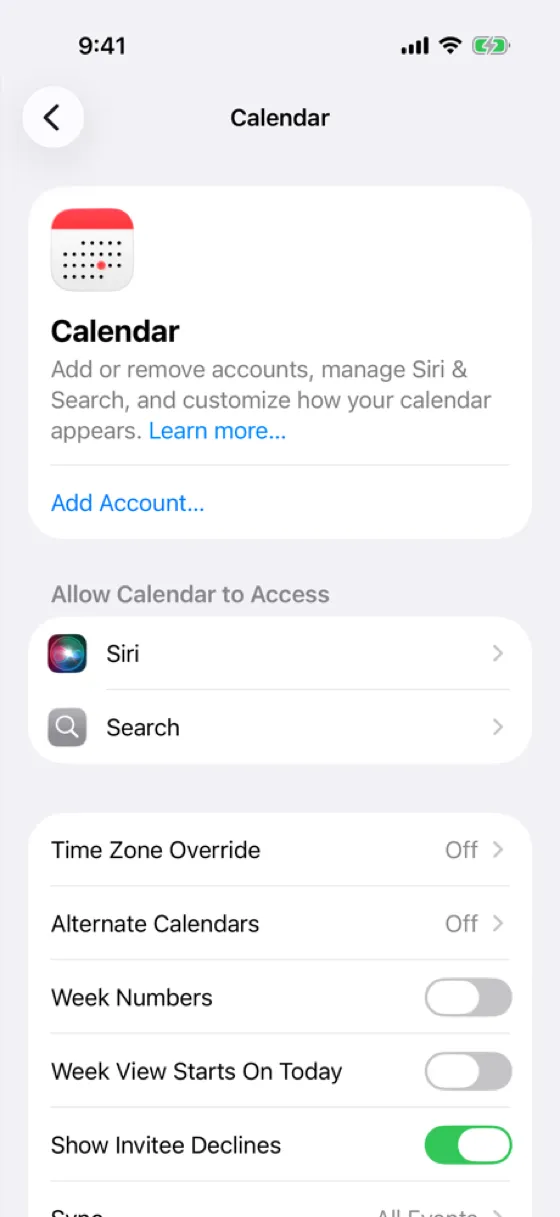
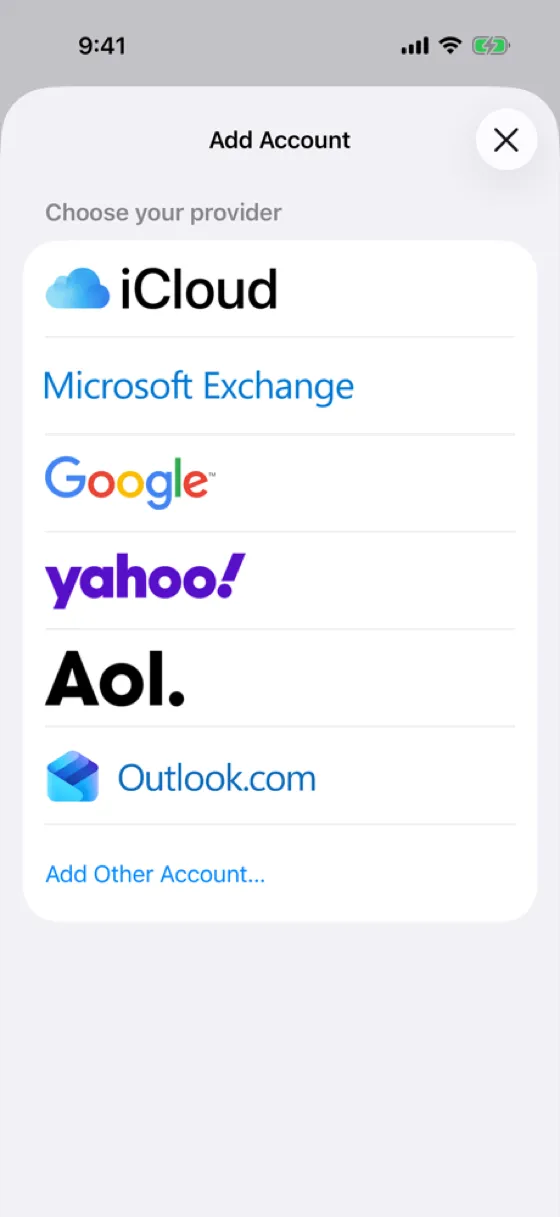
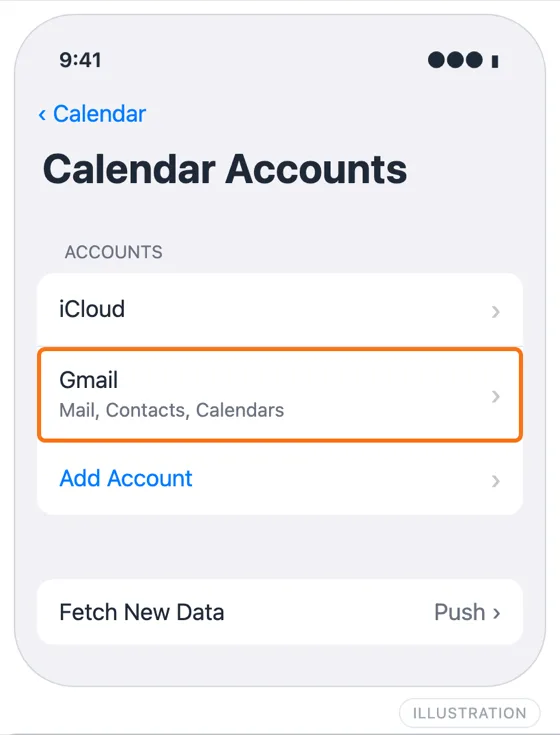
iOS labels the account Gmail by default, even for a Google Workspace address. Your primary Google calendar now appears in the Calendar app. Events you add on the phone to a Google calendar are saved to Google.
Show shared and secondary Google calendars (the sync-select step)
This is where most people get stuck. Google only sends your own primary calendar to Apple devices by default. Two kinds of calendar stay hidden until you switch them on:
- Calendars other people shared with you, such as a team calendar, a partner's calendar or a family calendar
- Secondary calendars you created yourself, such as "Kids" or "Side project"
To switch them on:
- On a computer, go to Google's Calendar sync page and sign in with the same Google account you added to your iPhone.
- Tick every calendar you want on your Apple devices, including the ones shared with you.
- Select Save.
- On your iPhone, close the Calendar app and open it again. Tap Calendars and tick the new calendars under your Google account.
It can take a few minutes for the new calendars to arrive. If one still doesn't appear, check that the calendar is actually shared with this Google account and not a different one. A Google Workspace admin can also stop calendars from being shared outside the organization.
Mac Calendar
- Open Calendar and choose Calendar, then Add Account from the menu bar.
- Select Google, click Continue, and sign in in the browser window that opens.
- When macOS asks which apps should use the account, keep Calendars ticked.
You can also add the account in System Settings, then Internet Accounts. Either way it's the same account, shared by Calendar, Mail and Contacts on the Mac.
The Google calendars appear in the sidebar under your Google account. If the sidebar is hidden, choose View, then Show Calendar List. Shared calendars follow the same rule as on iPhone: switch them on at the Calendar sync page. Google also notes that if you used to share calendars through the Delegation tab in Apple Calendar, you need to turn that off for sync to work.
Why events don't appear (fixes)
Only some calendars show up. Use the Calendar sync page step above. This is the cause most of the time.
No Google events at all. In Settings, Apps, Calendar, Calendar Accounts, tap the Gmail account and check that Calendars is on. Then check the calendars are ticked in the Calendar app's Calendars list.
Changes are slow to arrive. Google accounts on iPhone don't use push. In Calendar Accounts, tap Fetch New Data, choose the Google account and set it to Fetch, then pick a schedule such as every 15 minutes. Opening the Calendar app also triggers a fetch.
Old events are missing. In Settings, Apps, Calendar, set Sync to All Events if it's limited to a recent period.
The account says it needs attention after a password change. Tap the account in Calendar Accounts and sign in again. If that fails, delete the account and add it again.
Events appear twice. You probably have the same calendar twice: once through the Google account and once as a subscribed calendar or through a sync tool. Remove one.
A work Google account won't sign in. Your Google Workspace admin may limit which apps can sign in. Ask them, or use the Google Calendar app on iPhone instead.
Google vs Apple Calendar: why use both
Most people don't choose. Their employer runs Google Workspace, so work meetings, room bookings and colleagues' availability live in Google Calendar. Their personal life lives in iCloud: family calendars, the dentist, school events shared from a partner's iPhone.
Apple Calendar is good at showing both on your phone and Mac, with Siri, widgets and Apple Watch support. Google Calendar is good at the shared, scheduling side: "find a time", booking pages and meeting rooms. Adding Google to Apple Calendar gets you the first. It doesn't help with the second, because Google never sees your iCloud events.
When to use a sync tool instead
Adding your Google account to Apple Calendar is a viewing setup: one screen, two calendars. Use a sync tool when you need the calendars themselves to agree:
- People book you through Google and keep hitting personal appointments. Your iCloud events need to exist on Google as Busy blocks. A colleague's "find a time" or a booking page can't see them otherwise.
- You don't want personal details on the work calendar. A Free/Busy sync copies the time and nothing else.
- Outlook is involved too. A client or second job on Microsoft 365 can't be added to Google, and Apple Calendar only shows it on your own devices.
AllMyMeetings copies events between Google, iCloud and Outlook calendars:
- Connect your Google account and your iCloud account (with an app-specific password from Apple).
- Create a sync pair from the iCloud calendar to the Google calendar.
- Choose Free/Busy so the copies only say "Busy", or Full Details if both calendars are yours.
Google notifies AllMyMeetings as soon as something changes. Apple doesn't notify outside apps, so iCloud is checked every five minutes. The free plan covers one one-way Free/Busy sync. Two-way sync and Full Details are on Pro at $5 a month.
Frequently asked questions
Why don't my shared Google calendars show on iPhone?
Google only sends your own primary calendar to Apple devices by default. Calendars other people shared with you, and secondary calendars you created, have to be switched on at google.com/calendar/syncselect. Sign in with the same Google account, tick the calendars you want, select Save, then reopen the Calendar app on your iPhone. They can take a few minutes to appear.
Can I sync without adding my Google account?
Yes, as a read-only subscription. In Google Calendar on a computer, copy the calendar's Secret address in iCal format, then add it on your Mac with File, New Calendar Subscription, or on iPhone under Calendar Accounts, Add Account, Other, Add Subscribed Calendar. You can't edit the events, and they only update when Apple Calendar refreshes the link.
Is the Google account two-way in Apple Calendar?
Yes. Once your Google account is added, events you create or change in Apple Calendar on a Google calendar are saved to Google, and changes made in Google come back to your iPhone and Mac. A few Google features don't work in Apple Calendar, such as creating new Google calendars or booking rooms.
Does adding Google to my iPhone stop double-booking?
No. It shows Google and iCloud calendars side by side on your phone, but nothing is copied between them. Someone looking at your Google Calendar availability still can't see your iCloud events. To block that time on Google, copy iCloud events onto your Google calendar with a sync tool.
Start with AllMyMeetings for free and have your iCloud events block time on Google Calendar.
Google Calendar sync · Google Calendar not syncing? · How to sync Apple Calendar to Google Calendar
Ready to sync your calendars?
AllMyMeetings keeps Google, Outlook, and iCloud calendars in sync automatically. No card: your 14-day Pro trial starts when you connect your first calendar, and the free plan stays free after.
Get started for free